What Is Sodium Extra?
Sodium Extra is a Fabric-based Minecraft mod that expands the features of the Sodium rendering engine. While Sodium mainly focuses on improving game performance and increasing FPS, Sodium Extra adds more customization options and advanced video settings that help players control how Minecraft looks and runs.
The mod works as an addon for Sodium and brings back many useful settings that are not included in the original performance-focused mod. It gives players more control over graphics options, visual effects, and rendering behavior without replacing Sodium’s optimized rendering system.
Sodium Extra is mainly designed for players who want better performance along with deeper customization. It is useful for low-end systems that need optimization as well as high-end setups where players want more control over Minecraft’s visual settings.
Key Features and What They Change
Sodium Extra improves the overall Sodium experience by adding extra settings that give players more control over Minecraft’s graphics and performance. These options allow users to adjust rendering behavior, visual details, and gameplay settings according to their system capabilities.
The mod does not replace Sodium’s optimization features. Instead, it builds on them by providing additional customization options that are useful for players who want a more flexible video settings menu.
Rendering and Visual Tweaks
Sodium Extra adds several rendering-related options that help players fine-tune how Minecraft displays the world. These settings can improve visual quality while keeping performance stable.
Players can adjust details such as entity rendering, particle effects, fog behavior, and other graphical elements. This makes it easier to reduce unnecessary visual effects on weaker devices or improve the overall appearance on powerful systems.
The extra rendering controls are especially useful for players who use custom resource packs or want a balance between better visuals and higher FPS. By changing specific settings instead of lowering everything, players can create a smoother Minecraft experience without losing important visual details.
Performance and Framerate Options
Sodium Extra provides additional performance settings that help players manage Minecraft’s rendering workload. These options allow users to adjust different visual processes and improve frame stability, especially on systems with limited hardware resources.
Players can customize settings related to chunk rendering, animations, particles, and other background effects. Reducing unnecessary processes can help increase FPS and create a smoother gameplay experience without affecting the core Sodium optimization.
These performance controls are useful for players who want more flexibility than the default Sodium settings. Instead of applying general performance changes, users can fine-tune individual options based on their device capabilities.
UI, Debug and Quality-of-Life Features
Sodium Extra also adds useful interface and quality-of-life improvements that make managing Minecraft settings easier. These features improve the overall experience by providing better control over configuration and troubleshooting.
The mod includes additional video settings and helpful options that allow players to quickly adjust their setup without searching through multiple menus. This makes it easier to test different configurations and find the best balance between performance and visuals.
Debug-related features can also help players understand their game performance and identify settings that may affect FPS or rendering behavior. These small improvements make Sodium Extra more practical for both casual players and users who regularly optimize their Minecraft setup.
Compatibility & Requirements
Sodium Extra is designed to work with Minecraft Java Edition through the Fabric modding platform. Since it functions as an addon for Sodium, players need to install the required Fabric components before using the mod.
The compatibility depends on the Minecraft version, Fabric Loader version, and the installed Sodium version. Using matching versions of all required mods helps prevent crashes, missing features, and loading errors.
Supported Minecraft Versions and Fabric Requirements
Sodium Extra supports selected Minecraft Java Edition versions that are compatible with the Sodium and Fabric ecosystem. Players should always check that the mod version matches their Minecraft version before installation.
A working Fabric setup is required to run Sodium Extra. This includes Fabric Loader, Fabric API, and a compatible version of Sodium installed in the Minecraft mods folder.
Keeping Fabric and related mods updated improves stability and ensures that Sodium Extra features work correctly. Installing incompatible versions may cause launch problems or prevent the game from loading properly.
Supported Platforms and Environments (Singleplayer, Multiplayer, Modpacks)
Sodium Extra is mainly built for Minecraft Java Edition environments that use the Fabric mod loader. It works well in different gameplay setups, including singleplayer worlds, multiplayer servers, and larger modpacks that use Fabric-based optimization mods.
In singleplayer, players can use Sodium Extra to customize graphics settings and improve performance based on their system. The additional options make it easier to create a smoother experience while maintaining better visual control.
For multiplayer and modpacks, Sodium Extra works on the client side, meaning it usually does not need to be installed on the server. Players can use it to improve their own rendering performance without changing server gameplay mechanics.
Compatibility With Other Common Mods (Sodium, Lithium, Phosphor, Optifabric Alternatives)
Sodium Extra is designed to work alongside Sodium because it extends Sodium’s video settings and customization options. Both mods should use compatible versions to avoid conflicts or loading issues.
It can also be used with other Fabric optimization mods such as Lithium, which improves game logic and server-side performance. Since these mods focus on different areas, they can often work together to improve overall Minecraft performance.
Players should be careful when using older alternatives or graphics-related mods like OptiFabric-based setups. Some OptiFine-dependent features may not work with Sodium Extra because the mods use different rendering systems and compatibility methods.
Editing Config Files and Advanced Toggles
Sodium Extra allows advanced users to customize additional settings through configuration files. These files store mod preferences and can be edited manually to adjust options that may not appear directly in the Minecraft settings menu.
Editing configuration files is useful for players who want precise control over rendering behavior, performance options, and hidden toggles. However, users should change settings carefully because incorrect values may cause visual issues or reduce game stability.
Before making manual changes, it is recommended to create a backup of the configuration file. This allows players to restore previous settings if a change causes problems.
Common Configuration Pitfalls and Quick Fixes
One common issue with Sodium Extra configuration is using settings that are not supported by the installed mod version. Updating the mod or resetting the configuration file can often fix these problems.
Another problem occurs when players copy configuration files from different Minecraft versions or mod setups. Settings from another version may not work correctly and can lead to crashes or missing options.
If the game behaves unexpectedly after configuration changes, restoring the default settings is usually the fastest solution. Players can also check mod compatibility and update Fabric, Sodium, and related dependencies to maintain a stable setup.
Settings Overview With Recommended Presets
Sodium Extra provides additional settings that help players adjust Minecraft’s visuals and performance based on their hardware. The best configuration depends on system specifications, gameplay style, and whether the priority is higher FPS or better visual quality.
Using recommended presets can make setup easier, especially for players who are not familiar with advanced rendering options. These settings provide a balanced starting point that can be adjusted later according to personal preference.
Recommended Settings for Low-End Systems
Players using older or lower-spec computers should focus on reducing demanding visual features while keeping the game responsive. Lowering unnecessary effects can improve FPS and reduce frame drops during gameplay.
Recommended adjustments include reducing render distance, limiting particles, disabling heavy visual effects, and lowering animation-related settings. These changes reduce the workload on the graphics processor and help maintain smoother performance.
Low-end users should also avoid enabling too many quality-focused options simultaneously. A balanced configuration with performance-focused settings usually provides a better experience than trying to maximize every visual feature.
Sodium Extra Settings UI
The Sodium Extra settings interface expands the default Minecraft video settings by adding more customization options. The menu provides easier access to rendering controls, performance adjustments, and visual settings that are not available in standard Sodium.
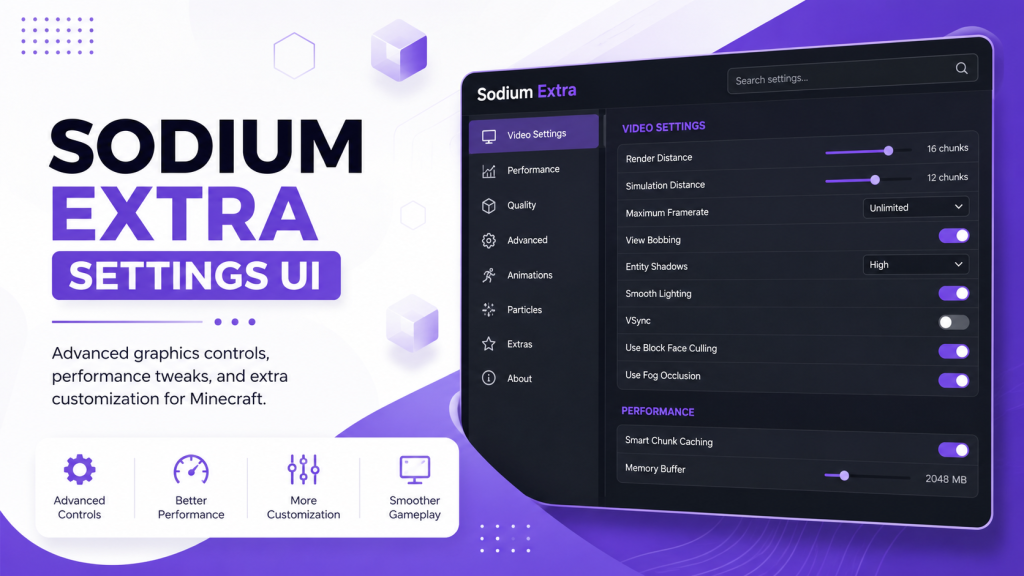
An image of the Sodium Extra settings UI can help users understand where different options are located before changing their configuration. It shows the additional controls available for adjusting graphics quality, animations, rendering behavior, and other performance-related features.
When using the settings menu, players should change options gradually and test the game after each adjustment. This makes it easier to identify which settings improve performance or cause visual changes.
Performance Expectations and Troubleshooting
Sodium Extra can improve Minecraft’s customization and help players optimize their setup, but the performance improvement depends on the hardware, Minecraft version, and other installed mods. The mod provides more control over settings rather than directly increasing FPS in every situation.
Players with weaker systems can often achieve smoother gameplay by reducing demanding visual options, while high-end systems can use additional settings to balance quality and performance.
Common problems usually come from incorrect mod versions, missing dependencies, or conflicts with other graphics-related mods. Checking Fabric Loader, Sodium, Fabric API, and Sodium Extra versions is the first step when troubleshooting launch or compatibility issues.
If problems continue, resetting Sodium Extra settings to default values can help identify whether a configuration change caused the issue. Keeping all related mods updated also improves stability and reduces compatibility errors.
FAQs
What is the Sodium Extra settings menu?
The Sodium Extra settings menu is an expanded video configuration interface for Minecraft Java Edition. It adds extra options to the standard Sodium settings, allowing players to control rendering features, visual effects, and performance-related options with more flexibility.
Does Sodium Extra settings menu improve FPS?
The Sodium Extra settings menu can help improve FPS by allowing players to disable demanding visual features and adjust performance-focused options. However, the actual improvement depends on the device hardware, Minecraft version, and other installed mods.
Can I use Sodium Extra settings without Sodium?
No, Sodium Extra requires Sodium because it works as an addon that extends Sodium’s features. Players need a compatible Sodium installation along with Fabric Loader and other required dependencies to access the additional settings.
Are Sodium Extra settings safe to change?
Yes, Sodium Extra settings are safe to adjust when changed properly. Players should modify options gradually and keep backups of configuration files before making advanced changes to avoid unwanted performance or visual issues.
Why are some Sodium Extra settings missing?
Missing settings usually happen because of incompatible mod versions, incorrect installation, or missing dependencies. Updating Sodium Extra, Sodium, Fabric Loader, and Fabric API can help restore unavailable options.
Conclusion About This Sodium Extra Settings Menu
The Sodium Extra settings menu gives Minecraft players more control over graphics, rendering, and performance adjustments. It expands the basic Sodium experience by adding useful customization options for different hardware setups.
Whether you want better FPS on a low-end system or more control over visual settings on a powerful PC, Sodium Extra provides flexible tools to optimize Minecraft. With the right configuration, players can create a smoother and more personalized gameplay experience.
Latest post
- How to Use Fullbright on Sodium in Minecraft
- How to Use Fresh Animations on Sodium in Minecraft
- Fresh Animations for Sodium: How to Install and Use in Minecraft
- Does Sodium Work With Distant Horizons? Compatibility and Installation Guide
- Does Sodium Have Fullbright? Complete Minecraft Lighting Guide